

How to Submit a Credit for Prior Learning (CPL) Petition in SURF
This tutorial walks you through the step-by-step process to request Credit for Prior Learning (CPL) at MiraCosta College using the PeopleSoft student portal. Follow the instructions carefully to ensure your request is submitted correctly and reviewed efficiently.
Step 1: Access the CPL Form
- Log into your SURF student portal.
- Navigate to the 'Student Forms' tile.
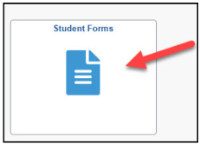
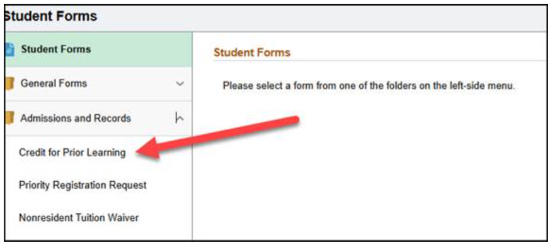
- Click on 'Credit for Prior Learning' under ‘Admissions and Records’.
Step 2: Review Enrollment Eligibility
- You must be currently enrolled in at least one course for the form to appear.
- You cannot request CPL for any course in which you are currently enrolled or have previously completed.
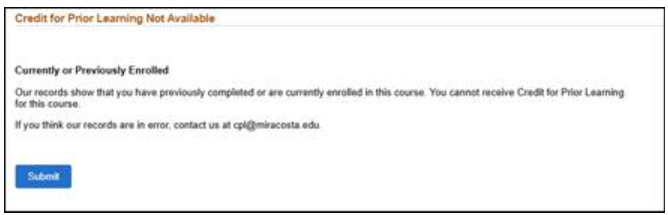
- If you try to request CPL for an ineligible course, you will see the following message:
“Our records show that you have previously completed or are currently enrolled in
this course. You cannot receive Credit for Prior Learning for this course.” If you
think these records are in error, contact us at cpl@miracosta.edu for assistance.
Step 3: Select the Course
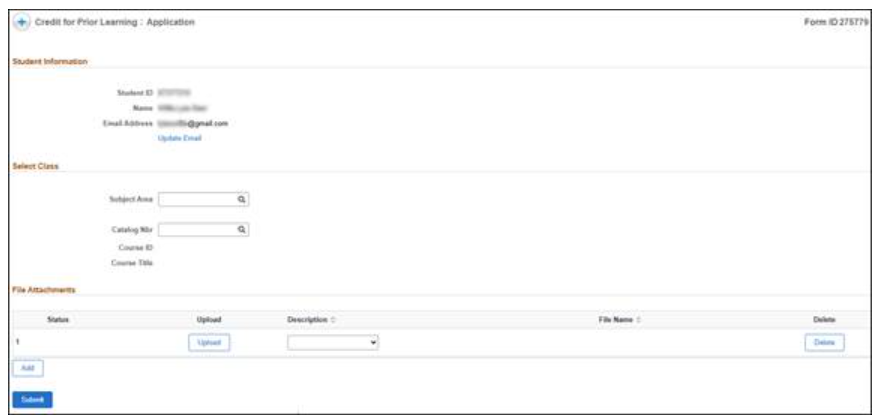
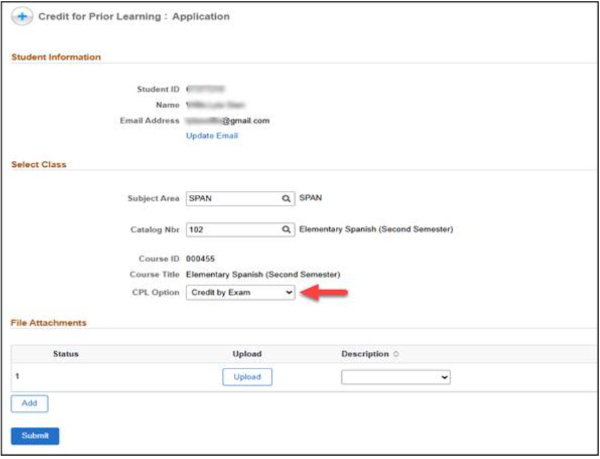
- Choose the appropriate Subject (e.g. CSIT) and Catalog Number (e.g. 180) for the course you wish to petition from the dropdown list. The Course ID and Course Title will auto-populate based on your selection. Verify that this information is correct.
- Only courses that are already approved for CPL will appear. If you do not see the
course, please contact us at cpl@miracosta.edu for assistance.
Step 4: Choose an Assessment Method
- Select one of the following assessment methods:
- Credit by Exam
- Industry Certification
- Portfolio
- Military Transcript
- Note: Only approved CPL options for the selected course will be available.
Step 5: Upload Supporting Documents
- Attach any necessary documentation (e.g. industry certificate) in PDF format, if applicable.
This field is not required; however submitting documentation during this step in the
process may help faculty complete their assessment faster.

Step 6: Submit the Form
- Click the 'Submit' button.
- After submitting, you will see a confirmation message and receive a confirmation at
your identified student email.
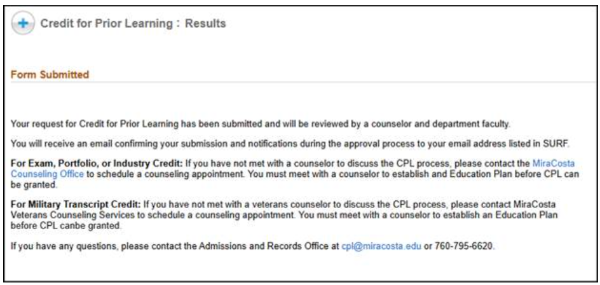
- Note: If Military Credit is selected, you will be advised to contact MiraCosta Veterans Counseling Services for further guidance.
Important Note
- You can only request CPL for one course per form. Each form is used to both direct requests to different faculty experts based on the course selected and then to transcribe your final grade. To request CPL for multiple courses, you must complete a separate form for each.
Step 7: Counselor Review
- Your form is automatically routed to one of two counselors for initial review:
Exams, Industry Certifications, and Portfolios: Markus Berrien
Military Transcripts: Donny Munshower - The counselor will review your request in alignment with your stated educational goals and student education plan. The counselor may reach out to you with additional questions and guidance, if needed.
- The counselor may approve or deny your request. You will be notified by email of status when submitted.
Step 8: Department Chair Review
- If approved by the counselor, your request is automatically routed to the Department Chair.
- The Department Chair may reach out to you with additional questions and guidance, if needed.
- The Department Chair may deny the request or approve and assign an instructor to assess your prior learning. You will be notified by email of status when submitted.
Step 9: Instructor Review
- The instructor will receive your form and conduct an assessment of your prior learning. They may contact you if additional information is needed or to explain the next steps in the assessment.
- If the request is denied, the instructor will provide a reason, and the request will be closed. You will be notified of the decision.
- If the request is approved, the instructor will complete the assessment and assign a grade to the course accordingly.
Step 10: Final Student Decision
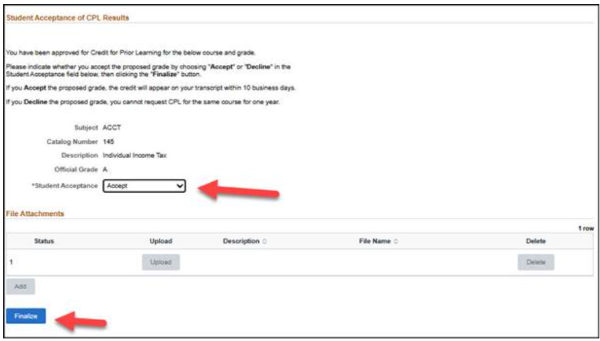
- If the instructor approves the request and assigns a grade, you will receive an email
with next steps to review the assigned grade. As required by California code of regulations,
you have the right to either accept or decline the assigned grade.
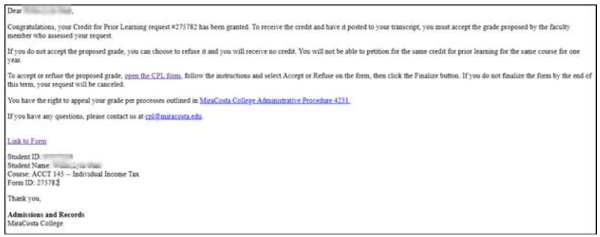
- You will be directed to the form and you can choose to accept or decline the grade.
- Accept: The course and grade are added to your transcript within 24 hours.
- Decline: The course is not recorded and you must wait one year to reapply for CPL
for that course
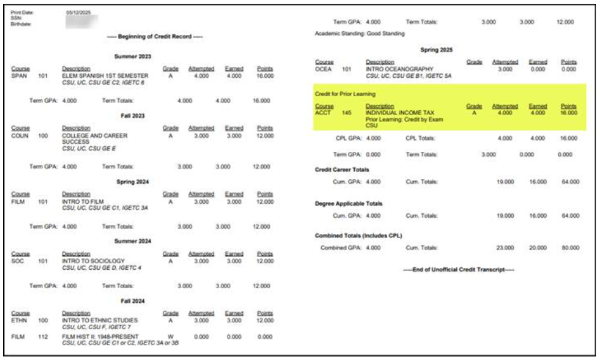
- If you have accepted the grade, the grade will be posted to your transcript.
Need Help?
If you have any questions or need assistance, please contact us at cpl@miracosta.edu.


